

A POS system should help a business operate today while preparing for tomorrow. As a result, when a Florida business adds employees, products, locations, sales channels, or seasonal capacity, its checkout system must keep up without creating unnecessary complexity.
A scalable POS system can connect payments with sales reporting, inventory, employee access, accounting, online orders, and customer information. As a result, that connection can make growth easier to manage for Florida retailers, restaurants, tourism businesses, service providers, and seasonal companies.

What Makes a POS System Scalable?
In general, a scalable POS system can support growth without forcing a business to replace its entire setup every time operations change. Therefore, it gives the business room to add capacity without losing control. To compare broader capabilities for growth, see this guide to modern POS systems for growing Florida businesses.
Scalability may include the ability to add:
- New employees and user permissions
- Additional terminals and devices
- More products or services
- New locations
- Online orders and payment links
- Inventory and accounting integrations
- Mobile checkout points
- Customer and loyalty features
- Detailed reports and approval controls
In other words, a scalable POS system should grow with the business instead of becoming a barrier to growth. As a result, that flexibility can reduce operational friction.
Why Florida Businesses May Need Scalable POS Technology
Florida businesses operate across a wide range of industries and markets. For example, retailers may serve local customers and seasonal visitors, while restaurants may add outdoor seating, delivery, or a second location. Meanwhile, tour operators may accept payments online, at a dock, and through mobile terminals. Similarly, vacation-rental managers may add properties and need better booking and payment records.
Florida’s visitor economy also creates seasonal changes in demand. According to VISIT FLORIDA, the state received an estimated 143.3 million visitors in 2025, excluding residents. As a result, businesses that serve visitors may need additional staff, equipment, inventory, and payment capacity during peak periods.
A scalable system can help a business add capacity while keeping reporting, permissions, and payment operations organized. At the same time, it can give owners a clearer view of performance.
Signs Your Current POS System May Not Scale
Your current system may be limiting growth if:
- Staff share one login
- Adding a terminal requires a complicated account change
- Reports cannot separate locations
- Inventory updates happen manually
- Online and in-person sales appear in different systems
- Refunds and voids lack approval controls
- The system cannot connect to accounting software
- You cannot add mobile checkout
- Employees spend too much time correcting data
- The provider cannot explain the total cost of expansion
Review the system before growth creates an urgent problem. Therefore, it is easier to test and train on a new system during a slower period than during a major sales rush.
Features to Look for in a Scalable POS System
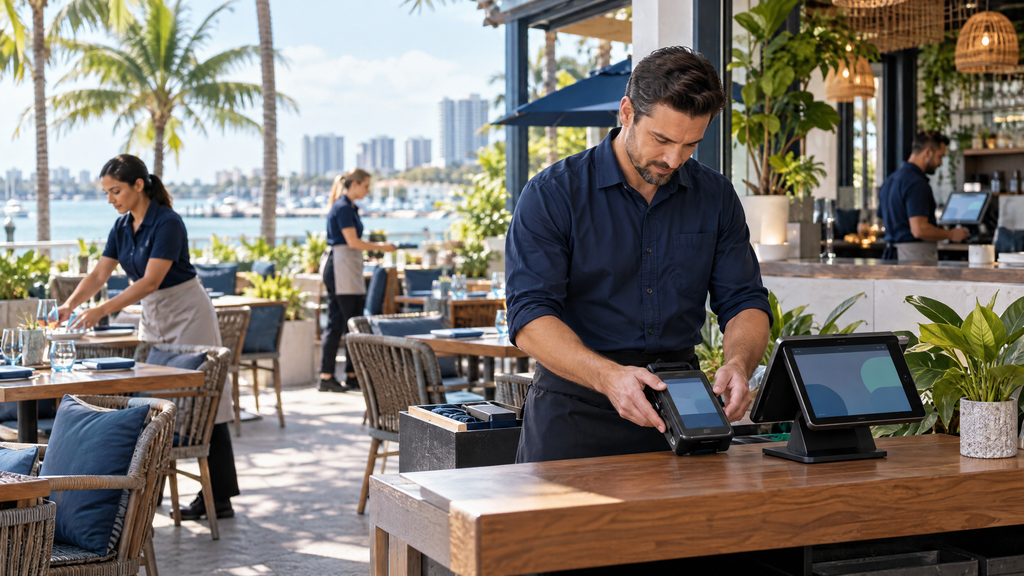
Multiple locations
For multi-location operations, a growing business may need centralized reporting while still allowing each location to manage its own sales, staff, inventory, and refunds. As a result, that balance gives owners visibility without removing local control.
Ask whether the system supports:
- Location-level reports
- Separate user permissions
- Centralized product catalogs
- Location-specific pricing
- Transfers between locations
- Location-level deposits
- Shared customer records
- Centralized administrative controls
A Florida retailer with stores in multiple cities may want corporate visibility without giving every employee access to every location’s data. That way, leaders can review results while local teams retain appropriate access.
Inventory management
Over time, inventory becomes harder to manage as a business adds products, locations, suppliers, or sales channels. Furthermore, a scalable POS system may connect barcode scanning, stock counts, purchase orders, product variations, reorder alerts, and location transfers.
Ask whether online and in-person sales update the same inventory records. Otherwise, the business may oversell products or spend more time correcting stock data.
Employee permissions
As operations expand, growth often means hiring new employees, seasonal workers, managers, or location supervisors. For that reason, each person should have an individual login and access appropriate to the role.
Look for controls for product and menu edits as the catalog expands; this guide to managing POS price changes in Florida covers approvals, launch timing, and verification.
- Refunds
- Voids
- Discounts
- Cash drawers
- Tips
- Reports
- Product changes
- User administration
- Time tracking
Do not rely on a shared password for a growing operation. Instead, individual accounts create better accountability and make it easier to review activity.
Payment and sales-channel integration
A growing business may accept payments through a storefront, website, mobile terminal, invoice, payment link, or marketplace. Therefore, the POS system should connect these channels where practical.
J.P. Morgan’s business payments guidance identifies POS systems, mobile readers, online gateways, and virtual terminals as options for different sales environments. Consequently, businesses should choose a system based on how they sell now and how they plan to sell next. Therefore, the choice should reflect expected growth.
Accounting and business software integrations
A POS system should reduce duplicate data entry instead of adding another disconnected database. Before choosing, ask whether it integrates with:
- Accounting software
- Payroll systems
- Inventory platforms
- E-commerce stores
- Booking and reservation tools
- Delivery systems
- Customer-management platforms
- Employee scheduling tools
Confirm which integrations are included, which require extra fees, and who handles support if the connection stops working.
Reporting and reconciliation
As a business grows, better visibility into sales and cash flow becomes essential. Therefore, reports should help the business compare sales, refunds, fees, tips, taxes, deposits, and inventory. For related guidance on open balances, payment reminders, and invoice follow-up, read the Florida POS unpaid-invoice guide.
A scalable system should make it possible to review:
- Sales by location
- Sales by employee
- Sales by product or service
- Average transaction size
- Refunds and voids
- Payment-method mix
- Processing fees
- Daily settlement totals
- Peak sales periods
Owners can make decisions using consistent data rather than manually combining reports from several systems. Consequently, that visibility can support better staffing, purchasing, and expansion decisions.
Equipment That Can Grow With the Business
Countertop terminals
For fixed checkout areas, countertop terminals suit retail counters, restaurants, offices, and ticket desks. When comparing them, choose devices that support chip cards, contactless payments, digital wallets, receipts, and software updates.
Wireless terminals
Wireless terminals can support tableside service, events, outdoor areas, curbside pickup, and additional checkout lanes. Before purchase, ask about connectivity, battery life, replacement devices, and security.
Mobile readers
Mobile readers can help contractors, tour operators, pop-up sellers, and service businesses accept payments away from a fixed counter. In addition, confirm smartphone compatibility, receipt delivery, and reporting.
Self-service and extra checkout points
A growing business may eventually need self-service kiosks, additional checkout stations, or payment points at another entrance or department. At that stage, ask whether the provider can add devices without creating separate, disconnected accounts. Otherwise, expansion may create more administrative work.
Understanding the Cost of Scalability
Overall, the cost of a scalable POS system may include:
- Hardware and replacement devices
- POS software subscriptions
- Additional users
- Additional locations
- Payment-processing fees
- Gateway fees
- Inventory or reporting modules
- Integration charges
- Training and onboarding
- Support plans
- Equipment leases or rentals
The cheapest initial package may not be the least expensive long term. Instead, compare the cost of adding a location, employee, terminal, integration, and software feature before selecting a provider. This approach reveals the likely cost of growth.
To compare expansion costs, ask for a growth-based quote that shows:
- Current monthly cost
- Additional terminal cost
- Employee expansion cost
- Second-location cost
- Online payment cost
- Integration and support fees
- Equipment ownership and cancellation terms
Security and Compliance for Growing POS Systems
For security guidance, the PCI Security Standards Council states that PCI DSS provides security requirements for environments where payment account data is stored, processed, or transmitted. Therefore, businesses should review their security responsibilities before expanding.
To protect the business, a growing operation should therefore ask:
- Does the system support encryption or tokenization?
- Are individual user accounts available?
- Can the business limit access by role and location?
- How does the provider protect stored payment data?
- Does the system support secure payment devices and software?
- How should employees inspect terminals for tampering?
- What PCI DSS responsibilities remain with the business?
- How does the provider communicate security incidents?
Even when a business outsources payment processing, it should train staff, protect credentials, apply updates, and follow secure procedures for refunds and customer data. In addition, management should review those procedures regularly. That way, security practices can keep pace with expansion.
How to Choose a Scalable POS Provider
Before signing an agreement, ask:
- How many locations and devices can the account support?
- Can I add employees without changing the entire plan?
- Can each location have separate permissions and reports?
- Does the system support mobile, online, and in-person payments?
- Can inventory synchronize across locations and sales channels?
- Can I export my data if I change providers?
- What happens if equipment fails?
- How quickly can new devices be delivered?
- Who handles software and integration support?
- What fees apply when the business expands?
- Can I review the complete agreement before signing?
Ask the provider to demonstrate how the system handles the next stage of your growth—not only your current checkout. That demonstration can reveal gaps that a sales presentation may overlook.
How Local POS Brokers Can Help
At Local POS Brokers, the team helps Florida businesses review merchant services, POS systems, terminals, mobile readers, payment gateways, and related equipment.
Whether you are opening a second location, adding online sales, preparing for tourist season, or replacing an outdated checkout system, a review can help you compare equipment, features, integrations, support, and total cost. As a result, you can make a growth decision with clearer information. As one example of a broad merchant-services lineup, The Direct Processors’ services section lists recurring billing, invoicing, a QuickBooks plug-in, electronic checking, gateway integration, and POS options. Confirm current availability and compare any provider’s terms with your needs.
Ready to choose a POS system that can grow with your Florida business? Contact Local POS Brokers for a merchant-services review.
Frequently Asked Questions
What is a scalable POS system?
A scalable POS system can support additional employees, products, terminals, locations, sales channels, integrations, and reporting needs as a business grows. In turn, it can reduce the need for a disruptive replacement.
How do I know if my POS system is scalable?
To test scalability, ask whether you can add users, devices, locations, inventory, online payments, integrations, and reporting without creating separate disconnected systems or unexpected costs.
Is a multi-location POS system necessary for every growing business?
Not always. A single-location business may need only a system with room to add staff and sales channels. However, businesses planning multiple locations should evaluate centralized reporting, permissions, inventory, and deposits early.
Can a POS system support online and in-person sales?
Many systems can connect in-person payments with online checkout, payment links, invoices, or a gateway. Before choosing one, confirm that the provider supports the specific platforms and integrations your business uses.
How much does a scalable POS system cost?
Costs vary by hardware, software, users, locations, payment processing, integrations, support, and contract terms. For that reason, request a growth-based quote instead of comparing only the starting package.
What should Florida businesses look for in a scalable POS system?
Look for reliable equipment, transparent pricing, location and employee controls, inventory and accounting integrations, mobile and online payments, reporting, security, and responsive support. In addition, confirm that the provider can support your next stage of growth.
One Reply to “Scalable POS Systems for Growing Florida Businesses”