

Quick answer: POS security is not limited to the card terminal. Florida businesses should protect the device, software, network, employee accounts, permissions, payment data, and daily procedures that support every transaction.
A restaurant, retailer, tour operator, contractor, or seasonal business may accept payments at a counter, online, at an event, from a mobile terminal, or through a payment link. Each channel creates operational responsibilities. This field guide gives Florida business owners a practical way to identify risks, protect equipment, train staff, and respond to suspicious activity.

Step 1: Start with a POS security inventory
Before improving security, identify everything that handles or supports payments. Use this inventory to document each device, location, user, and system connection.
Create an inventory for each category below:
- Terminals: Record the make, model, serial number, and location so the business can identify missing or replaced devices.
- Mobile readers: Record the assigned employee, storage location, and provider so staff can track equipment outside the main site.
- POS software: Record the version, administrator, and integrations to support update and access-control planning.
- Network: Record the router, staff Wi-Fi, guest network, and backup connection so payment operations remain separate from public access.
- Employee accounts: Record each user, role, location, and permission to limit unnecessary access.
- Connected systems: Record accounting, inventory, booking, and payroll connections to show where payment data or reports may flow.
- Provider support: Record the phone number, support portal, and incident contact so staff can respond quickly when something looks wrong.
Complete the inventory for every location. Then, update it whenever the business adds equipment, changes providers, opens a location, or assigns a new administrator.
Step 2: Use the Florida POS security risk map
Different business environments create different security needs. Review the risk map below before choosing equipment or writing procedures. For storm-specific continuity steps, see the Florida hurricane payment-planning guide.
Fixed storefronts and offices
Countertop terminals should remain visible to trained employees. Keep them away from unlocked storage, public access, and areas where someone could attach an unauthorized device without being noticed.
Restaurants and hotels
Tableside and wireless terminals move through busy spaces. Staff should know which devices belong to the business, where they should be used, and how to return them after each shift.
Tour operators and outdoor businesses
Mobile readers may operate at docks, beaches, vehicles, parks, or event sites. Protect them from loss, water exposure, heat, theft, and unapproved handling.
Seasonal businesses
Temporary employees may use terminals only for a few weeks or months. Training, individual logins, limited permissions, and prompt access removal are especially important.
Multiple locations
A business with several stores, offices, or event teams needs location-level permissions and a current device list. Otherwise, a missing reader or unusual refund may be difficult to trace.
Storm and power disruptions
Florida businesses should consider backup power, secure storage, internet alternatives, provider contacts, and a written process for moving or pausing payment operations during a disruption.
Local planning note: The right procedure for a retail counter may not work for a mobile tour operator. Match the control to the place where the payment actually occurs.
Step 3: Protect the physical terminal
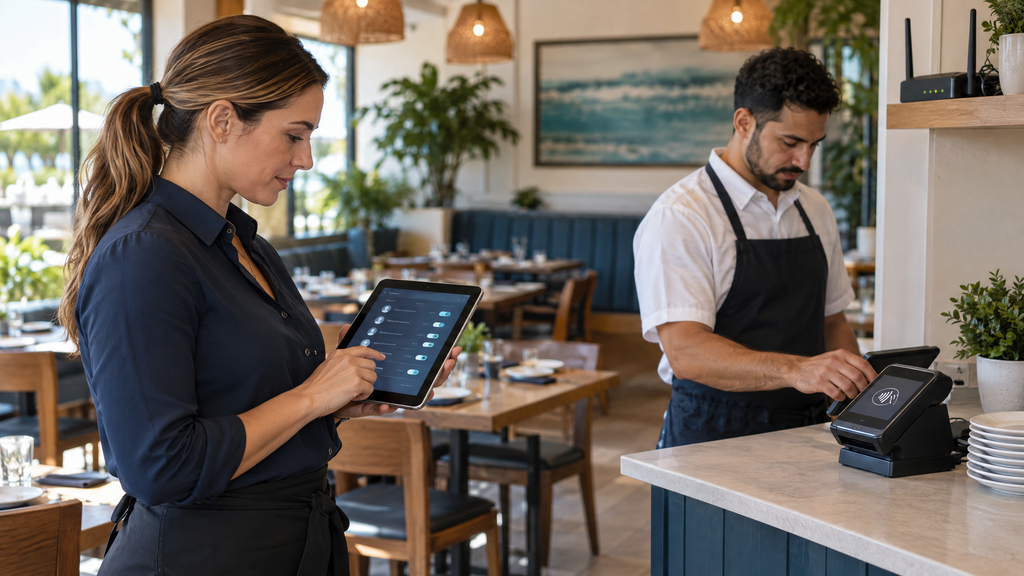
Use this terminal inspection checklist at opening, during shift changes, and whenever a device returns from a mobile location.
- Does the terminal look like the approved device?
- Are labels, seals, cables, and ports unchanged?
- Is there an unfamiliar overlay, attachment, or loose part?
- Is the screen displaying an unexpected message?
- Does the serial number match the equipment record?
- Is the device in its approved location?
- Has anyone reported unusual behavior?
Keep countertop devices where employees can see them. Store mobile readers in a controlled location, use protective cases when appropriate, and maintain a record of who has each device.
If a terminal looks altered, stop using it. Do not dismantle or repair it yourself. Instead, notify the manager and contact the payment provider through a trusted channel.
Step 4: Control employee access
A secure POS system gives each employee only the access needed for the job. Shared credentials make it difficult to identify who completed a refund, changed a price, or accessed a report.
Suggested permission levels
Use role-based access as a starting point:
- Cashier: Allow payment acceptance and receipt reprints; review access to refunds, discounts, and voids.
- Server or attendant: Allow payment and tip entry; review access to refunds and price changes.
- Shift manager: Allow routine adjustment approvals; review access to user administration and reports.
- Location manager: Allow location-activity reports; review access to payment settings and data exports.
- Administrator: Allow user and system configuration only to trusted personnel; protect full access and account-recovery controls.
A seasonal employee may need checkout access but not permission to export reports or change users. Remove access when an employee leaves or changes roles. Furthermore, review permissions at regular intervals instead of assuming they remain appropriate.
Step 5: Strengthen accounts, passwords, and networks
Use a unique account for each employee whenever the POS supports individual logins. Passwords should be difficult to guess, different across systems, and never written on a note beside a terminal.
A Florida business should also consider:
- Multi-factor authentication
- A password manager for administrator credentials
- Automatic screen locking
- Separate staff and guest Wi-Fi
- Secure router configuration
- Limited administrator access
- Regular account reviews
- A trusted process for password recovery
Employees should never install software, reset a password, or disclose account details because of an unexpected email or phone request. Verify unusual requests through an approved provider contact.
Step 6: Keep software and integrations current
POS applications, payment software, routers, tablets, computers, and connected systems may require updates. Updates can address security concerns, compatibility problems, or performance issues.
Before applying an update, confirm:
- Which devices and locations are affected?
- Is a backup required?
- Will the update create downtime?
- Will accounting, inventory, booking, or payroll integrations continue to work?
- Who provides technical support if the update fails?
- How will staff test a payment afterward?
A written update plan can reduce the chance that a business discovers a compatibility problem during its busiest period.
Step 7: Understand PCI DSS responsibilities
The PCI Security Standards Council states that PCI DSS provides security requirements for organizations and environments that store, process, or transmit payment account data.
The Council’s merchant guidance includes practices such as using approved PIN-entry devices, validated payment software, protected networks, strong passwords, restricted access, and regular device checks.
Using a payment processor does not automatically remove every responsibility from the business. The exact responsibilities depend on the business’s devices, software, payment channels, integrations, and provider arrangement.
Ask the merchant-services provider:
- Which security controls does the provider supply?
- What responsibilities remain with the business?
- Does the solution support encryption or tokenization?
- Which devices and software are approved?
- How should the business complete required assessments?
- What should staff do after a suspected incident?
Step 8: Create a simple incident-response card
Keep a short response card near the manager’s workstation. Staff should not have to search through an old email when a terminal appears compromised.
If a POS terminal seems altered, missing, or replaced
- Stop using the device.
- Do not dismantle or repair it.
- Keep the device and surrounding area available for review.
- Notify the manager or designated security contact.
- Contact the provider through a trusted channel.
- Record what happened, when it was noticed, and who used the device.
- Follow the provider’s incident-response instructions.
- Review whether connected accounts or systems require additional attention.
Avoid unsupported conclusions before the provider or a qualified security professional evaluates the situation.
Step 9: Run a 30-day POS security action plan
Days 1–7: Identify
Create the device inventory, list every payment channel, identify administrators, and document provider support contacts.
Days 8–14: Restrict
Replace shared logins, review employee permissions, remove former users, separate guest Wi-Fi, and secure administrator accounts.
Days 15–21: Inspect
Check terminals, mobile readers, routers, cables, storage areas, and software versions. Record anything that needs provider review.
Days 22–30: Train and test
Train employees on device inspections, phishing, refunds, lost readers, suspicious requests, and incident reporting. Test a backup contact method and confirm that staff can complete a normal payment after updates.
By the end of the month, the business should have an equipment list, access review, inspection routine, incident card, and provider contact process.
Step 10: Questions for a POS or merchant-services provider
Use these questions when reviewing a new system or checking an existing provider:
- Which terminals and payment applications are approved for use?
- Does the system support individual employee logins?
- Can access be limited by role and location?
- Is multi-factor authentication available?
- How are software and security updates delivered?
- What happens if a mobile reader is lost or stolen?
- How can the business identify device tampering?
- What PCI DSS responsibilities remain with the business?
- Who should staff contact after a suspected incident?
- Can the provider support secure online, mobile, and in-person payments?
- How are refunds, voids, and administrator actions recorded?
- What security training or documentation is available?
Before signing, ask the provider to explain the security workflow in plain language and demonstrate the relevant controls. As part of that review, check these merchant-services red flags business owners should know when evaluating provider terms, fees, support, and equipment.
How Local POS Brokers can help
Local POS Brokers helps Florida businesses review POS systems, terminals, mobile readers, merchant services, payment software, and equipment requirements.
A review can help identify whether the current setup includes appropriate devices, permissions, reporting, support, and procedures for each location and sales channel. For an example of a broader merchant-services lineup, The Direct Processors’ services section lists recurring billing, invoicing, a QuickBooks plug-in, electronic checking, gateway integration, and POS options. Confirm current availability and compare provider terms with your business needs.
Ready to strengthen POS security for your Florida business? Contact Local POS Brokers for a merchant-services and equipment review.
Frequently asked questions
What is POS security?
POS security is the combination of physical, technical, and administrative controls used to protect payment terminals, POS software, employee accounts, networks, transaction data, and connected business systems.
How can a Florida business protect a payment terminal?
Inspect devices regularly, keep them in controlled locations, track serial numbers, restrict access, train employees, apply updates, protect networks, and contact the provider if a terminal looks altered.
Should POS employees share one login?
No. Individual logins improve accountability and make it easier to control access, investigate activity, and remove permissions when an employee leaves.
What should a business do if a terminal is tampered with?
Stop using it, do not dismantle it, record what was noticed, notify management, and contact the payment provider through a trusted channel for instructions.
Does PCI DSS apply to small Florida businesses?
PCI DSS requirements can apply to businesses that accept, process, transmit, or otherwise participate in payment-card transactions. The business should confirm its specific responsibilities with its provider and qualified security professionals.
How should seasonal Florida businesses handle POS security?
Train temporary employees, assign individual logins, limit permissions, inspect devices, track mobile equipment, and remove access when the season or employment ends.
One Reply to “POS Security and Terminal Protection for Florida Businesses”